I am really curious about this new feature in CJA. So I tried to pinpoint exactly how it would help a business based on current documentation. So far this is what I gathered… a scenario that might feel familiar.
You open CJA on a Monday afternoon. You look at your order count. Something feels off. You switch over to Power BI, which reads from the same source table in your data warehouse. The number is noticeably higher.
Different tools. Different numbers. Right?
Maybe it’s the business logic applied in PBI though. You can add many filters. So that should probably be the reason.
We just haven’t applied the same in CJA. Problem solved.
You congratulate yourself with a Danish pastry and a cup of coffee. But then you look at the metrics in PBI and realize that you cannot subtract the pastry from your past now. It has been devoured.
Both PBI and CJA are using the same filters. You even ask the BI team to confirm. They confirm and ask why you didn’t buy pastries for them as well.
Anyway…there can still be many possible reasons for a discrepancy like this. But one of them is this: mutable records like orders not being kept in sync between warehouse and AEP. That is one of the problems Data Mirror is designed to address.
First: What Is a Snapshot?
Before we talk about Data Mirror, we need to talk about how data normally gets into AEP and how that affects what we see in CJA.
A common pattern is called batch ingestion. Instead of synchronizing data continuously, data is exported from the source at scheduled intervals. That could be once a day, a few times a day, or triggered on a schedule. Then it’s uploaded to AEP as a file or snapshot.
I try to think of it like this.
Imagine your data warehouse is a warehouse floor. Every night at 2am, someone walks through and takes a photograph of every shelf. It shows what products are there, in what quantity, in what state. That photograph gets sent to your analytics team, and they work from it all day.
By 10am, things have moved because products were sold. But some were returned and a delivery just came in. But your analytics team is still looking at last night’s photograph.
That photograph is your batch snapshot. It was accurate at 2am. By now, it isn’t.
Why This Breaks for Certain Data
For some data types, the snapshot approach works perfectly fine. Because it doesn’t change state all the time.
But a lot of business-critical data doesn’t work that way. Some data has a state that changes over time:
- An order starts as “placed”, then “pending”, “becomes “confirmed”, then “shipped”, then maybe “returned” or “terminated”
- A loyalty tier moves from Silver to Gold as a customer accumulates points
- A subscription is active, then paused, then cancelled
- A support case is open, then escalated, then resolved
This is where things get complicated.
Whether a batch pipeline handles updates cleanly depends entirely on how it was built. But that is basically where the data travels to get to its destination (AEP). Like when Mario travels through the pipes to get to a new location.

Some teams solve this by writing ETL (extract, transform, load) processes that deduplicate records, handle status changes, and manage deletions before data ever reaches AEP. That works, but it requires effort to build and maintain.
Without that kind of pipeline in place, you could end up with multiple versions of the same record in AEP.
Order #101 with status “Shipped” from Monday’s export.
Order #101 with status “Returned” from Tuesday’s.
Which one is correct? I don’t think AEP has a native way to know.
Then there are deletions: an order that was cancelled and removed from the source. That doesn’t exist in the batch. The next export just doesn’t include that row. The old version stays in AEP indefinitely.
I see this as something Data Mirror can help eliminate. Not because using batch ingestion in AEP is wrong, but because it gives AEP native support for row-level inserts, updates and deletes, without requiring you or others to build that ETL logic yourself.
What Data Mirror Actually Is
Data Mirror is a different approach to moving data from your warehouse into AEP. Instead of sending a full copy of your table every night, it tracks and sends only what changed.
The technical term for this is Change Data Capture aka CDC. Your source system keeps a log of every mutation: every insert, every update, every delete. Data Mirror reads that log and replicates those specific changes into AEP, continuously.
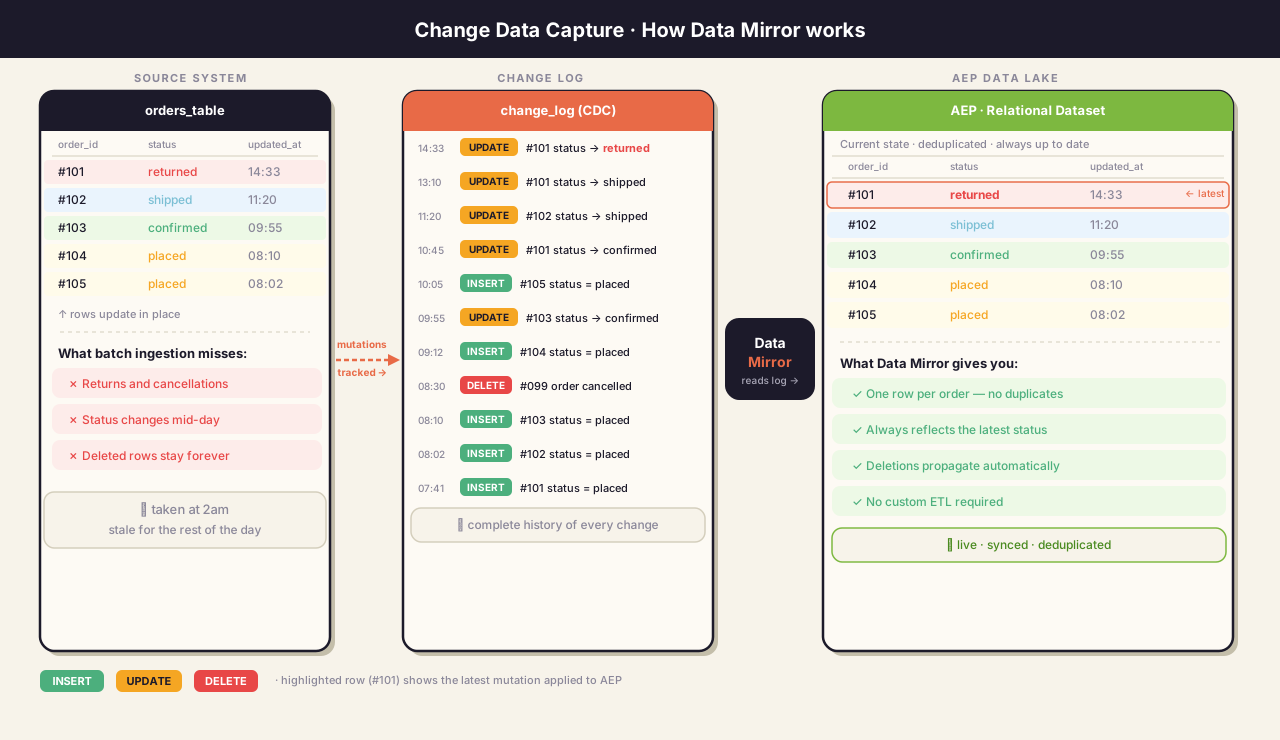
Going back to the warehouse analogy: instead of a nightly photograph, imagine a live logbook. Every time something changes on the floor, it gets written down immediately.
Order #101 moved to Returned at 10:32am.
Customer ID 8844 upgraded to Gold at 14:15pm.
The analytics team doesn’t work from a photo anymore… they have a live, running record of the current state.
So the data in CJA will reflect what your warehouse actually looks like right now. Not what it looked like at 2am.
How It Works in AEP
This is still quite new, but here’s what I’ve gathered so far:
1. Your source tracks its own changes
Your data warehouse (BigQuery, Snowflake, Databricks, etc.) needs to be set up to record changes. This means your tables need a unique identifier per row (a primary key) and a timestamp showing when a row was last modified. Some warehouses need a small configuration change to enable this.
2. AEP uses a special schema type
Normal AEP schemas are built around events (things that happened once and don’t change) or Profile schemas (the more static information). Data Mirror requires a Relational Schema, a different type specifically designed for data that evolves. It has three important rules built in:
- Primary Key : makes sure you never end up with duplicate rows for the same record
- Version Descriptor : tells AEP which version of a row is the most recent, even if updates arrive out of order
- Timestamp : keeps everything in chronological sequence
3. The source connector runs continuously
Instead of a nightly batch job, a source connector syncs changes on a configurable schedule. Near real-time rather than once a day. It reads the change log from your warehouse and applies each mutation (insert, update, or delete) to the corresponding record in AEP.
More Than Just Freshness: Relational Data in AEP
It is worth considering something Adobe emphasizes in their documentation that is easy to miss.
Data Mirror is not only about keeping data up to date. CDC pipelines have existed for a long time. Many teams already run them. What is new here is that AEP now understands relational data structures natively.
Standard AEP schemas are built around events: things that happened once and are recorded as-is. They weren’t really designed to model a database table with a primary key, relationships between rows, and version history.
The Relational Schema type that Data Mirror requires brings that to AEP:
- Primary keys : row uniqueness is enforced at the platform levle
- Version descriptors : AEP knows which version of a record is authoritative
- Relationship preservation : the structure of your source data is maintained, not flattened
This means you don’t need to solve these problems in ETL before data reaches AEP. The platform handles it. For organizations that have historically had to build and maintain custom deduplication pipelines just to get clean data into AEP, this is arguably the bigger shift.
Some More Examples
So this is where i’m trying to figure out how it can make an impact for a business… in practice. I have already touched upon the orders’ change status as an example to start with. I’ve also looked at some of Adobe’s own exmaples:
Loyalty Programs
A customer upgrades from Silver to Gold at 2pm. With a daily batch, CJA still sees them as Silver until tomorrow morning. Any analysis of loyalty tier distribution, tier-based behaviour, or upgrade patterns is working from yesterday’s state not today’s.
Subscription and Contract Status
For subscription businesses it’s also important knowing the current state of every customer (active, paused, or churned). With a daily batch, churn analysis in CJA is always working from yesterday’s picture. A customer who cancelled this morning is still counted as active until the next sync runs. That can be alright for some use cases while a red flag for other cases where we need the warehouse update.
A Few Things Worth Knowing
It is going generally available on June 18, 2026. Data Mirror has been in limited testing beta and becomes generally available for Customer Journey Analytics on June 18, 2026. Currently supported sources are Azure Databricks, Google BigQuery, and Snowflake.
You still need CJA to be configured correctly. Data Mirror solves the data freshness and deduplication problem. It does not fix mismatched business logic between tools. If your Power BI report filters out cancelled orders and CJA includes them, the numbers will still differ … just for a different reason.
Is Data Mirror the Right Solution for Your Problem?
Adobe defines Data Mirror as the tool for mutable data -> records that are subject to inserts, updates, and deletes over time. I think that is the key word. If the data is mutable, Data Mirror is relevant. If it isn’t, the problem lies elsewhere.
Maybe a good way of figuring out if this is a good solution, you can ask one question:
✨When a record changes state, say, an order moves from “confirmed” to “sale”, does your source system create a new row, or does it update the existing one?✨
If it updates the existing row, your data is mutable. Standard batch ingestion was never built to track those changes, and the updated state may never reach AEP correctly. This is the scenario Data Mirror addresses.
If it creates a new row for each state change, your data is append-only. Then the problem is likely not a Data Mirror problem. It could probably be an ingestion issue: incremental logic that only picks up records by creation date, missing historical backfill, filtering in the source connector, or records failing schema validation. Those are worth investigating in your AEP ingestion monitoring before considering Data Mirror.
I really think understanding how these things are running behind the scenes is essential for most data-users, when numbers suddenly look off. I don’t think Data Mirror magic, but it can definitely be a great way of handling certain types of data and remove some frustration.
Basically, if your data is constantly changing state and you’re only treating it like a daily photo, things will drift. Then you end up debugging numbers, consuming liters of coffee, running millions of queries, and feeling a slight sense of betrayal.
Anyway, I made a great solution over the weekend. So if you click here, all your data problems will disappear. For real.
Join the discussion
Leave a comment