Webtracking and Analytics has existed for a very long time. And I am not even sure if it has become more or less complicated over the years. I still think Props and eVars are a bit funky, and that CJA is much better to work with compared to Adobe Analytics. But that might just be a matter of taste. 🍷
But there are some core elements of web tracking: how does behavior on my website get into my analytics tool?
Let’s say you have a website. We can call it example.com.
Maybe you want to track something basic like page views, the page name, or time on site.
What you’d normally need is a Tag Manager.
A Tag Manager listens to events and behavior on the website. Whenever something happens, it can execute a rule that collects a specific piece of data and sends it to your analytics tool. That is a very high-level explanation. Let’s go one level deeper.
What exactly is a Tag Manager?
A Tag Manager is a small piece of code that loads on every page of your website. Once it’s there, it can see everything that happens in the browser: page loads, button clicks, form submissions, scroll depth .. all of it.
The most common Tag Manager in the Adobe world is Adobe Experience Platform Tags (often called Launch, because that was its original name). But you might also come across Google Tag Manager if you’re working in a different environment.
The Tag Manager itself doesn’t do much on its own. Think of it as a control panel. The actual instructions live inside rules. A Tag Manager can collect some browser and page context automatically without requiring a business-specific implementation. But for richer and more reliable tracking, it often relies on a data layer available on the website. It can then read those values and send them to analytics and marketing platforms such as AA or CJA.. or GA..
The Tag Manager makes the bridge between the data on the website and the tools that consume and process that data.
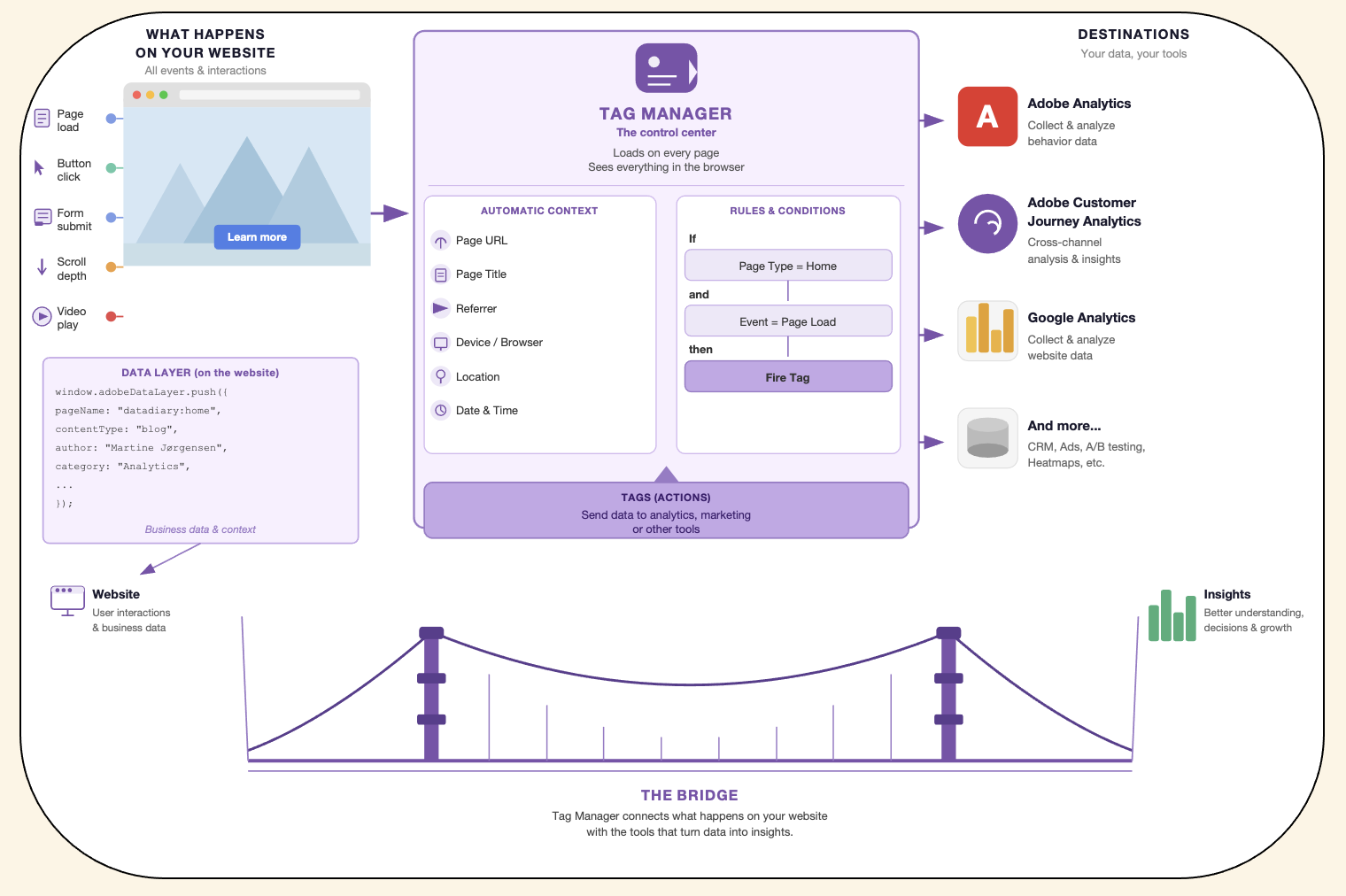
Rules: The ‘If → Then’ of Web Tracking
We don’t need to go into too much detail about the Tag Manager in order to understand webtracking. But it’s useful to have a rough idea of how they work. The tag manager uses rules. Let’s just focus on that.
A rule is a set of instructions. It has three parts:
- Trigger — what needs to happen before anything fires (a page load, a button click, a specific page being visited)
- Condition — an optional filter to make the rule more specific (only fire on the checkout page, only fire if the user is logged in)
- Action — what should actually happen when the trigger fires (collect some data, send it to Adobe)
So a rule might look like this in plain language:
If the page loads and the URL contains
/checkoutthen collect the page name and send a page view to Adobe Analytics.
That’s it. That’s the basic pattern behind almost every tracking setup.
But Where Does the Data Come From?
Good question. The Tag Manager fires the rule. But how does it know what the page name is? Or what products are in the cart?
As earlier mentioned, if you have a very basic setup, the Tag Manager can collect some generic browser and page information on its own, such as the URL, page title, referrer, device type, or scroll behavior. This is already available without any implementation needed. This is often enough for simple traffic analysis.
But when you need business-specific tracking like product details, cart contents, logged-in state, checkout steps, subscriptions, or customer types, that information usually needs to be exposed on the website itself. This is not something generic that is just available via the browser-details. This is often done through a data layer implemented together with developers. Then the deveolpers make sure to push the right values at the right time.
Not sure what a data layer is?
A data layer is a structured collection of information that your development team puts on each page. Think of it as a list of attributes, describing everything relevant about the current page or the specific event (what just happend on the page): the page name, the product category, form sign-up, whether the user is logged in, and so on.
A very basic data layer might look like this. I just visited a page named ‘Checkout - Delivery”’ while being logged in:
window.digitalData = {
  page: {
    name: "Checkout - Delivery",
    section: "Checkout",
    language: "en-US"
  },
  user: {
    loginStatus: "logged-in"
  }
}
We can also use this website as an example:
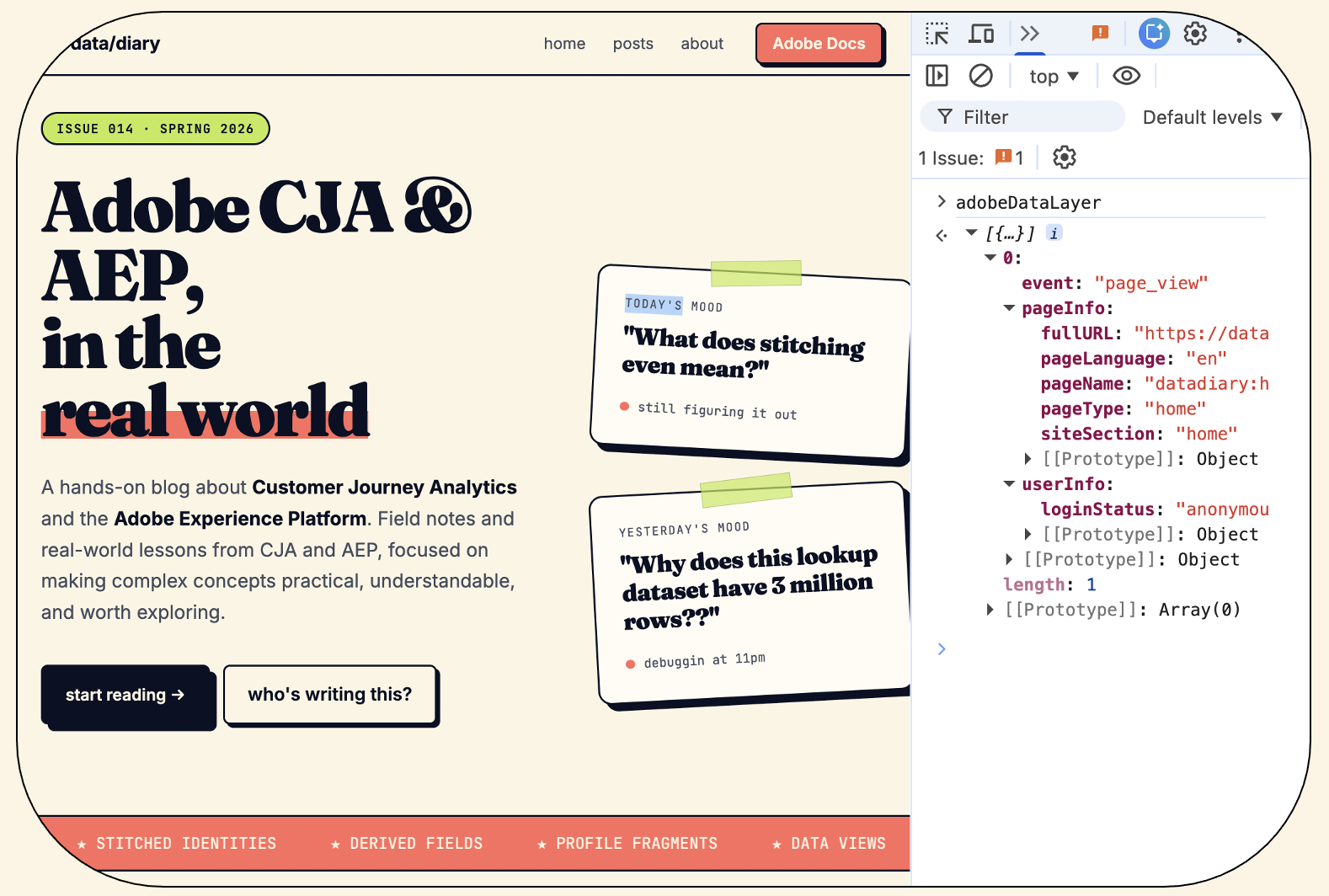
So here’s the home page. I decided that i want to track some details about my pages across the whole site. Then I can see how much traffic there is, how different sitesections perform, if people are logged in or not and so on.
This is just a simulated datalayer. I ain’t tracking.
Point is: when the Tag Manager fires a rule, it reads from this datalayer and picks up the values it needs. So the page name that ends up in your analytics report? It came from the data layer.
Without a data layer (or with a poorly maintained one), the Tag Manager has to guess. It might try to read the page title from the HTML, or figure out where the user is by reading the URL. That works until the URL structure changes.. and then suddenly nothing makes sense anymore. I would always use datalayer whenever possible. It’s stable.
The data layer is usually driven by the Business Requirements Document (BRD). This is where the business outlines the tracking requirements and measurement needs: what do we actually need to know about our website and what is the business value of that insight?
The Beacon: Sending the Data to Adobe
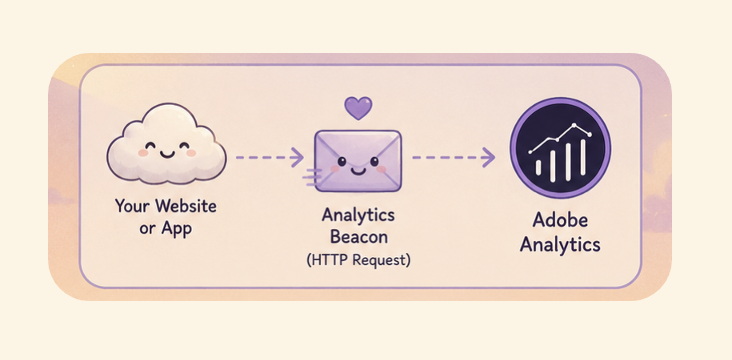
Once the rule fires and the data is collected, it needs to be sent somewhere. That “somewhere” is Adobe’s servers, and the act of sending it is called a beacon … or sometimes a tracking call or network request.
You can think of a beacon like sending a text message. The moment a rule fires, a tiny message is sent from the user’s browser to Adobe. That message contains all the data collected by the rule: the page name, what the user clicked, which product they were looking at.
Adobe’s servers receive that message, process it, and a few seconds later the numbers appear in your report.
For Adobe Analytics, this beacon is a classic, lightweight request. It has been working this way since the early days of digital analytics, and it’s remarkably simple under the hood. Illustrated below as cute as possible:
For Adobe Experience Platform (AEP) and CJA, the setup is a bit more modern. Data is sent through something called the Edge Network, which is Adobe’s way of receiving data and routing it to the right places -> your dataset in AEP, Adobe Analytics, Journey Optimizer.. all from one single signal.
Maybe you can picture something like this. It’s like a super smart post office that knows where each package should go:

Adobe Analytics vs CJA: Two Different Worlds
This is where the two tools really start to differ from each other.
Adobe Analytics
Adobe Analytics uses a fairly fixed structure. When data arrives, it gets stored in numbered containers called Props, eVars (dimensions), and Events. Props capture simple information about what was on the page. eVars can remember information across multiple pages (so if someone adds something to the cart on page 1 and buys it on page 5, the eVar can still connect those two moments). Events are the counters.. page views, orders, revenue.
The challenge is that you have a limited number of these containers, and you have to decide upfront what each one means. It’s a bit like having a filing cabinet with labelled drawers, and everything has to go in the right drawer. If you later want a drawer to mean something different, you have to relabel it and all the old data in that drawer already has the old label on it.
This is why experienced Adobe Analytics teams keep a document called a solution design reference, essentially a map of what each variable means, so nobody loses track.
CJA (Customer Journey Analytics)
CJA works more flexibly. Instead of numbered containers, it connects directly to your data in AEP and lets you build your own dimension and metric layer on top of it, called a Data View. You decide what becomes a dimension and what becomes a metric, and you’re not limited by a fixed number of containers.
If your data contains a field called “delivery option chosen”, you can just use it directly in CJA. No need to map it into a numbered variable first.
The Full Picture
This is quite often how the flow works:
- A user visits example.com
- The browser loads the page, including the Tag Manager
- The data layer gets populated (page name, login status, etc.)
- The Tag Manager reads the data layer and checks its rules
- A rule fires (for example: a page just loaded on the checkout page)
- A beacon is sent: a small message from the browser to Adobe Analytics server with all the relevant data
- Adobe processes it and the number appears in your analytics tool
That is it. That is how a click becomes a number.
The Part That Often Goes Wrong
In theory, this setup is clean. In practice, a lot can go wrong between step 1 and step 7.
The most common issues I have seen:
- The data layer is incomplete or inconsistent. The development team populates it on some pages but not others, or the field names differ between page types.
- The rules in the Tag Manager are fragile. They rely on specific page structures, custom code or URL patterns that break whenever the website gets redesigned.
- Variables get reused over time. A dimension that used to store “campaign source” now stores “product category”. The historical data gets mixed together and becomes impossible to trust. (can happen in AA)
- Nobody validated the implementation. Data was collected from day one, but nobody checked whether it was correct. By the time someone noticed a problem, months of data were already off.
This is why implementation quality matters so much. The analytics tool can only work with what it receives. Same goes to any AI model. They are not magical.
If the data going in is wrong or incomplete, no amount of clever analysis or AI will it on the other end.
The Fundamentals Don’t Really Change
The tools evolve. The Adobe stack has gotten more sophisticated over the years. But the core pattern stays mostly the same:
A Tag Manager, a data layer, a rule, a beacon.
Join the discussion
Leave a comment