The question behind every analytics project
When working with Customer Journey Analytics, it is tempting to think of the Connection as just some technical step in the setup. Something that needs to be configured correctly, but ultimately sits in the background while the real work happens in analysis and reporting.
Everything seems fine with that assumption, until stakeholders start asking questions the data cannot clearly answer.
In one case, I was trying to understand a simple user journey in CJA started and realised how fragmented it really was. Returning customer behavior looked unusually low, and conversion paths did not make much sense.
The reason turned out to be the Connection setup. ECID was used as the Person ID, meaning the same customer could appear as multiple people across devices and browsers.
A customer researching on mobile and purchasing later on desktop could appear as two separate people with two seperate journeys. Early touchpoints became disconnected from the final conversion, attribution shifted toward lower-funnel interactions, and the overall customer journey looked far less coherent than it actually was.
At first glance, nothing was broken. The data was flowing, dashboards were populated, and the implementation appeared sound. But the explanation was not found in the reports themselves. It was found much earlier, in how the Connection had been configured.
So at the center of the issue was a very simple question: who is the person in this dataset?
What exactly is a CJA Connection?
Before we get into the interesting stuff, a quick grounding.. I need that sometimes.
A CJA Connection is what links Adobe Experience Platform (AEP) to Customer Journey Analytics (CJA). You pick which datasets from AEP you want to analyse, configure a few key settings, and CJA starts pulling that data into a unified view you can query.
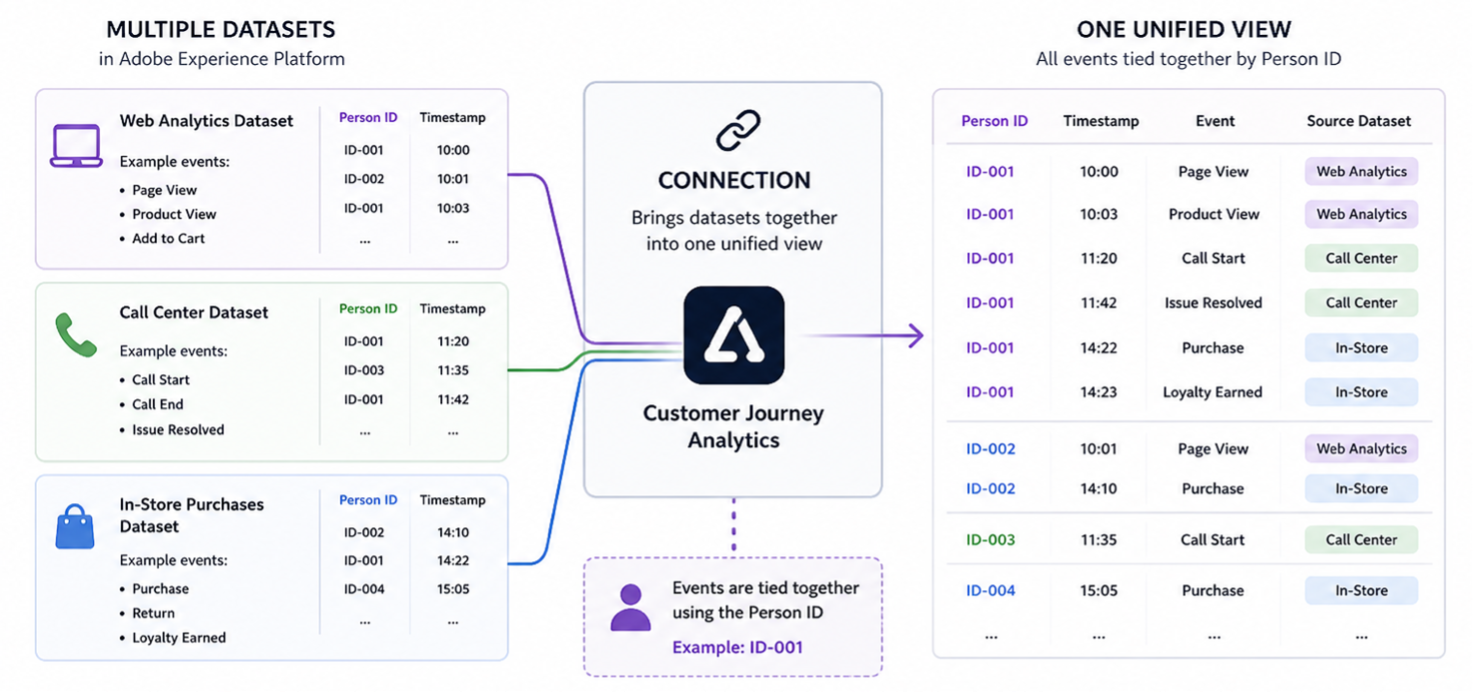
A Connection defines five things:
- Which datasets are included. Event, profile, and lookup datasets. Not every dataset needs to be in every connection. That is something the business needs to define the use case for.
- The Person ID of each dataset. The field that tells CJA which events belong to the same person. This is the most important decision.
- The dataset type and its role. Event datasets provide the behavioral stream. Profile datasets enrich people with attributes. Lookup datasets add classification and context.
- The backfill window. How far back in history CJA ingests data — more on this later.
- Whether stitching is enabled. The mechanism that connects anonymous sessions to known customers. It does not happen automatically.
And then we can define more specifically the dimensions, metrics and other things in the data views: attribution, persistence, transformations, formatting etc. But I will not go through data views in this article.
What is a “person” in CJA?
Defining what it means to be a person, as a unique individual, a nuanced and complex being. Sounds deep. And it is.

In CJA, the ✨Person ID✨ is the anchor of everything. It is the one thing that tells CJA: these events, these page views, these transactions all belong to the same unique person.
When you add a dataset to a Connection, you select one field as the Person ID. This might be:
- A CRM ID (a unique customer number from your customer database, only present when someone is logged in)
- An ECID (Experience Cloud ID, the cookie-based identifier Adobe assigns to every browser and device, present even for anonymous visitors)
- An email address, a loyalty ID, or any other stable identifier..
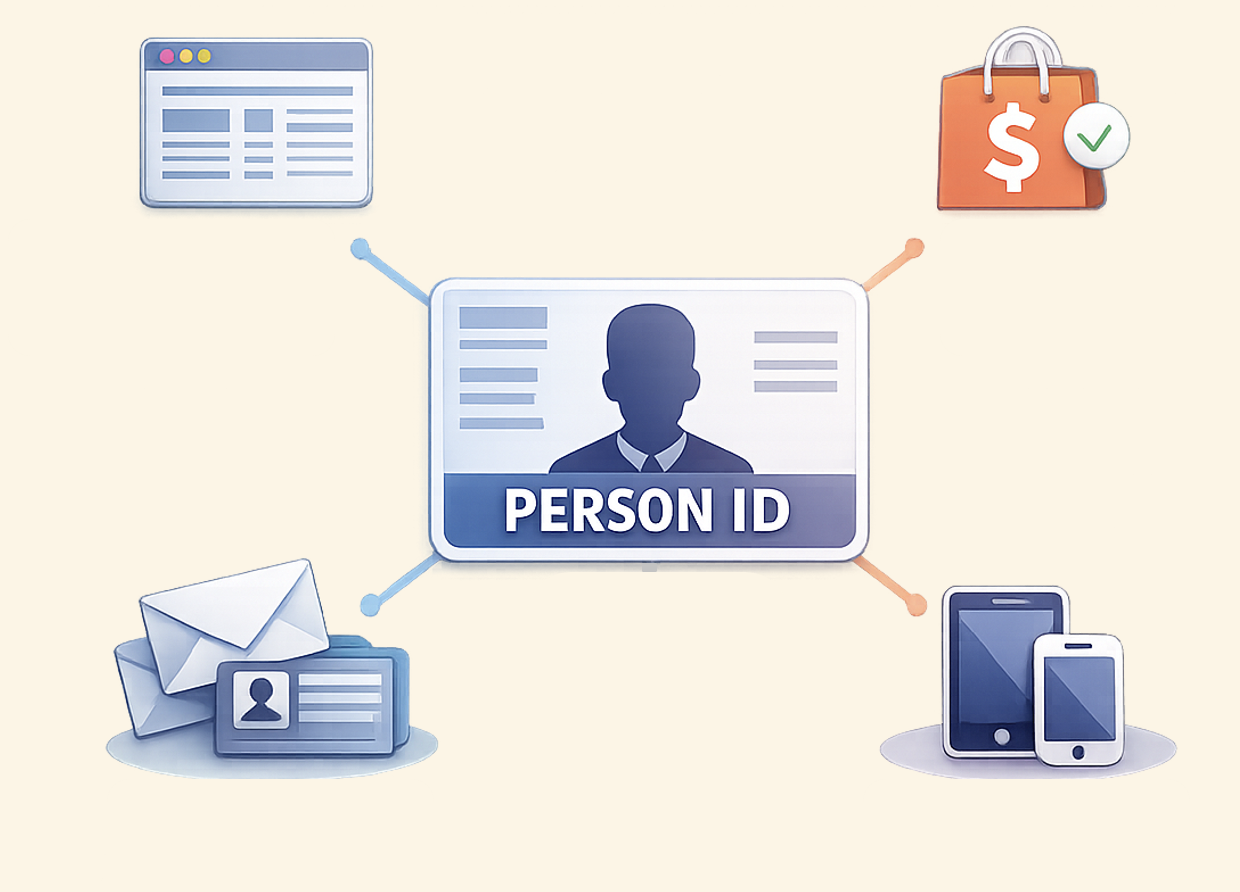
That seems straightforward… until you realize the choice has direct effects on:
- How sessions are constructed and how session metrics are counted
- Whether cross-channel journeys can be assembled or remain siloed
- Whether your conversion rates reflect actual human behavior or are inflated by identity fragmentation
- Whether attribution models credit the right touchpoints in a journey
One ID or identityMap?
I haven’t really payed much attention to this before. Now I realised that it actually good to know.
When a connection has been created, a lot of decisions have been made in the connection UI. Including whether to define a person by a single ID or by using the IdentityMap.
Picking a single ID (like a CRM ID) feels like the cleanest option. One person, one identifier. But in practice (and without stitching), a lot of user activity happens without that identifier present: before login, after logout, on a new device. This why I think it’s important to understand the impact of selecting the single ID. You have basically told CJA to only recognize that one ID. So all behavior that does not have that exact ID will sit outside your definition of a person.
Using identityMap is an alternative approach. Rather than a single flat field, identityMap is a structure (typically populated via the Web SDK) that holds multiple identifiers at once.

I think of it as a container: one event might carry an ECID, a CRM ID after login, and potentially other identifiers, all stored together.
This is how fun it looks in the UI:
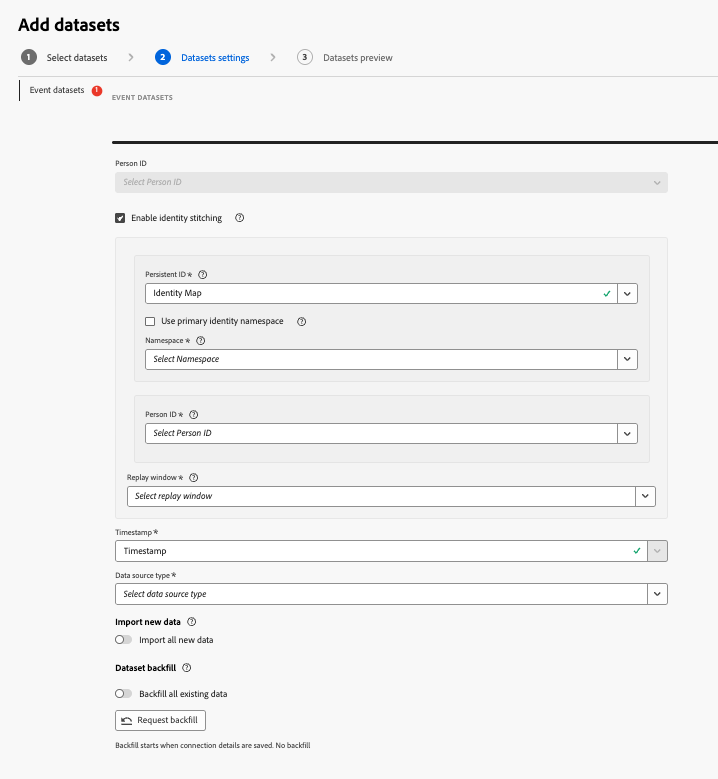
This is how I see it:
Selecting a specific field as your Person ID works well when your dataset has a clean stable field, like customer_id or ECID. You select your persistent and transient IDs, and you’re done.
identityMap makes sense If your datasets use different identifiers. Example: on web you collect ECID and sometimes hashed email. In identityMap, identities are stored in a shared identityMap field containing multiple IDs tied to the same person, such as ECID, CRM ID, email, etc.
I think in practice, use a simple flat ID field when your datasets have clean ID’s. Use identityMap when your SDK/AEP setup contains multiple identities and you need more flexible cross-channel identity handling and stitching.
Why one real person can look like many
Without deliberate configuration, a single customer can appear as multiple “persons” in your data. Which is not only super frustrating, but it also quietly breaks every analysis that follows.
Consider a real journey:
- Monday: A customer visits your website. They are not logged in. Their events carry an ECID, Adobe’s anonymous device identifier.
- Wednesday: They return and log in. A CRM ID is now associated with their events.
- Friday: They call your support center. A different internal customer ID appears.
- Saturday: They buy in-store. A loyalty card ID is captured at the point of sale.
This is just one person. But four touchpoints. And without the right configuration, CJA may treat these as four separate people.
This is not just an inconvenience. It becomes a real business problem when you have invested heavily in tools like CJA and AEP and are expecting a return on that investment.
| Dimension: Person ID | Events | Persons | Sessions | Notes |
|---|---|---|---|---|
| Total | 4 | 1 | 1 | |
| CRM-4821 | 1 | 1 | 1 | Wednesday login |
| (No Value) | 3 | — | — | Mon · Fri · Sat events |
If CRM ID is selected as the Person ID in your connection, CJA counts one person correctly. But the three events where no CRM ID was present sit under “No Value” and remains disconnected from the known customer entirely.
The “(No Value)” row is actually a useful signal. If you see a large proportion of your events sitting there, your Person ID field is probably not being populated consistently. In the example above, it is expected. But in many real setups, it can be a warning sign worth investigating.
The business cost of identity fragmentation
Conversion rates: Journeys that cross an authentication event appear broken. The anonymous session and the authenticated purchase are counted as separate persons, so conversion is understated.
Attribution: The touchpoint that drove the decision (often an early anonymous visit) gets no credit. Since you didn’t get the full picture. Your attribution model tells a factually incorrect story, which leads to misallocated marketing budgets.
Segment accuracy: A segment defined as “customers who viewed product X and did not convert in 7 days” will be inflated. Most of those apparent non-converters actually did convert, just under a different ID.
LTV calculation: Lifetime value calculations that do not connect across channels will severely undercount individual customer value, making the best customers look like average ones.
Stitching: the configuration that changes everything
Stitching is the mechanism that connects anonymous sessions to known customers over time. I strongly believe it is not a reporting feature but a data quality investment. Fight me.
I even dare to say: planning for stitching from day one, as part of your CJA implementation, is key to getting real value from the tool. Introducing it retroactively makes historical data unreliable, and that tends to shake data trust across the whole organization. Not a fan.
CJA offers two stitching approaches depending on the license.
Field-based stitching (CJA Select)
Field-based stitching works within a single event dataset. It uses two identifiers:
- Persistent ID: Always present, even for anonymous visitors. Typically the ECID.
- Transient ID: Only present when the user is authenticated. Typically a CRM ID or customer login ID.
When a login happens and the transient ID appears, CJA looks back across all events that share the same persistent ID and retroactively assigns the transient ID to them. Anonymous behavior before login is now linked to the known customer.
Graph-based stitching (CJA Prime)
Graph-based stitching goes further. It leverages the AEP Identity Graph, which may already know that ECID-A, email-B, and loyalty-ID-C all belong to the same person based on matches across datasets. This cross-dataset identity resolution is applied at query time. It is the most powerful form of identity resolution in the platform, and it enables analytics that span channels even when no single dataset carries all identifiers.
How stitching actually runs
I had to really wrap my brain around what actually happens when stitching has finally been enabled in a dataset. I’ll be focusing on field-based stitching in this post. This method operates in two distinct phases, and I really think understanding both is essential for reading the data correctly.
Phase 1: Live stitching Runs in real time as events arrive. For devices that have already authenticated, CJA can immediately apply the known identity to new events. Brand new, never-seen devices remain unstitched until replay runs.
Phase 2: Replay stitching Runs periodically (daily or weekly). CJA goes back in time and retroactively stitches events from devices that have since authenticated, up to the length of the lookback window.
To me live stitching is the immediate, best-effort picture. While replay stitching is the corrected, more complete picture.
The data improves over time as replays run .. which is exactly why recent data should be treated as provisional.
The replay window is important!
The replay window defines how far back replay stitching can reach.
| Daily replay (24h) | Weekly replay (7 days) | |
|---|---|---|
| How often data updates | Every day | Once a week |
| Stitching coverage | Less — user must authenticate within the same day | More — captures multi-day journeys |
| Data stability | Stable, numbers don’t change much | Numbers shift after each replay |
| Journey length captured | Short journeys | Longer journeys reconstructed |
| Attribution accuracy | Early touchpoints often missed | Attribution is more complete and fair |
| Main risk | Checkout looks like the first step | Reports are not final until replay completes |
A practical example: a customer views a product on Monday and logs in on Wednesday.
- With a 24-hour window, the Monday session is never stitched. It stays in “(No Value).”
- With a 7-day window, the full arc is captured and Monday is connected to the conversion.
With a 7-day window, numbers you see today may look different in 7 days once replay has run. This is not a data quality problem. Instead of reacting to changing numbers afterward and having the endless discussion about the data accuracy, I think as an analyst, I’d try to stay ahead of the conversation and prepare stakeholders before delivering dashboards and reports.
Recent data should be treated as more provisional, while week-old data is generally more stable and reliable. This makes clear communication around what the numbers actually represent even more important when working with stitched datasets in CJA.
Three connections, three definitions of a person (this is the fun part!)
Maybe this is mostly for my own sake, but this is where I want to make it concrete. Because the way you configure a connection will define what “a person” actually means inside every report, every funnel, and every business decision that follows.
So I explored three different scenarios using the same underlying data across three separate connections, each resulting in a very different analytical reality.
The data foundation throughout:
- Web behavioral data collected via Adobe’s Web SDK (carrying an ECID for every visitor, anonymous or not)
- Call center interaction data (carrying a Customer ID when the caller is identified)
Scenario A: No stitching, CRM ID as Person ID
The most common starting point. Two datasets, a sensible Person ID choice, no stitching. It feels reasonable. The gaps only become visible when you look at what the data actually shows.
Connection settings
| Setting | Value |
|---|---|
| Dataset 1 | Web data |
| Dataset 2 | Call center data |
| Person ID | Customer ID (present on login and authenticated calls) |
| Stitching | Not enabled |
The Customer ID is a logical choice. It is stable and unique. The problem is not the ID itself, but what happens to all the events where the customer is not yet identified.
What CJA shows
| Customer ID | Events | People | Sessions |
|---|---|---|---|
| Total | 10,000 | 1,840 | 1,840 |
| CRM-0042 | 6 | 1 | 2 |
| CRM-1187 | 3 | 1 | 1 |
| CRM-2291 | 4 | 1 | 1 |
| … | … | … | … |
| (No Value) | 7,200 | — | — |
One person equals one Customer ID. That part works. But notice the “(No Value)” row: 7,200 events. That is a large portion of all traffic sitting in a bucket with no known Customer ID.
What you can and cannot see
| ❌ | First visits and pre-login browsing |
| ❌ | Full campaign traffic picture (most ad clicks land on anonymous sessions) |
| ❌ | Product discovery and research before login |
| ❌ | The actual entry into the funnel |
| ✅ | Cross-channel analysis between web and call center (when both carry a Customer ID) |
| ✅ | Cross-device analysis (when the same person logs in on a second device) |
The cross-channel capability is kinda possible. A customer who logs in on the website, places an order, and then calls support can be followed across both touchpoints. That is exactly what this connection is designed for.
But any behavior that happens without authentication is invisible. And in most digital experiences, that unauthenticated phase is the majority of the journey. Same applies to any other dataset where the CRM ID is not populated consistently.
A real journey under this setup:
| Step | Event | Visible in CJA? |
|---|---|---|
| 1 | Visits product page (not logged in) | ❌ No : unknown |
| 2 | Visits Contact page (not logged in) | ❌ No : unknown |
| 3 | Logs in and places order | ✅ Yes : known |
| 4 | Returns to FAQ page (not logged in) | ❌ No : unknown again |
| 5 | Calls customer service | ✅ Yes : known |
We would be missing the nuances of the journey entirely. Consider the cost of customer service calls. Did we need to provide more information in the FAQ section? We cannot tell.
What the raw data looks like: why stitching is needed:
The table below shows the same customer’s events. Even though we have both the cookie ID (ECID) and the Customer ID on some events, CJA will not connect them without stitching enabled.
| Event | Time | Customer ID | Cookie ID (ECID) |
|---|---|---|---|
| Page view | 12:01 | — | 246 |
| Page view | 12:02 | — | 246 |
| Page view | 12:03 | — | 246 |
| Login + Order | 12:09 | Bob | 246 |
| Page view | 12:11 | — | 246 |
Without stitching, Bob’s pre-login events and post-login events are treated as different people. Now I am using Bob as an example. But that is still the CRM ID..
Scenario B: Field-based stitching enabled
Same two datasets, same Customer ID as the anchor, but now we enable field-based stitching on the web dataset. This is where CJA starts doing detective work.
Connection settings
| Setting | Value |
|---|---|
| Dataset 1 | Web data: field-based stitching enabled |
| Persistent ID | ECID (always present, even for anonymous visitors) |
| Transient ID | Customer ID (present only when logged in) |
| Dataset 2 | Call center data: Customer ID as Person ID |
| Stitching | Field-based, enabled on web dataset |
The mechanism: every web event already carries an ECID, always. When a login happens and a Customer ID appears, CJA looks back across all events sharing that ECID and retroactively assigns the Customer ID. Anonymous behavior before login is now linked to the known person.
What CJA shows after stitching
| Customer ID | Events | People | Sessions |
|---|---|---|---|
| Total | 10,000 | 1,840 | 1,840 |
| CRM-0042 | 14 | 1 | 6 |
| CRM-1187 | 7 | 1 | 5 |
| CRM-2291 | 5 | 1 | 5 |
| … | … | … | … |
| (No Value) | 2,100 | — | — |
The “no value” bucket shrinks significantly. The remaining unknowns are genuine: visitors who never authenticated within the replay window, or real anonymous traffic who are not customers.
How the stitching actually works: live stitch vs. replay:
This is still a bit new for me. I haven’t seen much of this stitching stuff applied in the real world…yet. But that is changing now.
| Event | Time | ECID | After live stitch | After replay |
|---|---|---|---|---|
| Page view | 12:01 | 246 | 246 (unknown) | Bob |
| Page view | 12:02 | 246 | 246 (unknown) | Bob |
| Page view | 12:03 | 246 | 246 (unknown) | Bob |
| Login | 12:04 | 246 | Bob | Bob |
| Page view | 12:05 | 246 | Bob | Bob |
| Page view | 12:03 | 3579 | 3579 | 3579 (never logged in) |
| Page view | 12:09 | 3579 | 3579 | 3579 (never logged in) |
| Page view | 12:02 | 81911 | 81911 (unknown) | Bob |
| Login | 12:05 | 81911 | Bob | Bob |
| Page view | 12:12 | 81911 | Bob | Bob |
Live stitching works forward from the login event immediately. Replay stitching goes back in time retroactively. ECID 3579 never logged in, so it stays unknown. ECIDs 246 and 81911 are eventually connected to Bob through different sessions, and replay stitches their earlier anonymous events retroactively.
Scenario C: No stitching, ECID as Person ID
The setup that looks the most complete. But is actually the most limited for customer analysis.
Connection settings
| Setting | Value |
|---|---|
| Dataset | Web data only |
| Person ID | ECID |
| Stitching | Not enabled |
With ECID as the Person ID, every single event belongs to a “person.” Person counts look complete. Sessions look complete. Funnels close. Nothing falls into “(No Value).”
But there is a critical distinction: in this connection, a “person” is a device and browser combination, not a human being.
What this actually means:
| Situation | Result |
|---|---|
| Same person on mobile and desktop | Two different “people”: two different ECIDs |
| Same person clears cookies | A brand new “person” from CJA’s perspective |
| Cross-channel analysis (web + call center) | Not possible: no shared identifier |
| Customer-centric metrics (LTV, churn) | Meaningless at this level |
| On-site behavior and funnel analysis | Clean and reliable |
| Device-level drop-off analysis | Reliable |
If you are purely interested in on-site behavior (which pages perform, where funnels break, how content drives engagement) this is a strong and clean setup. It breaks down the moment you ask any question about the actual person behind the device.
But then, having CJA for that purpose is a bit much innit?
Also worth noting: person counts here will be inflated compared to your actual customer base. If an executive looks at “3.2 million people visited this month” and interprets that as 3.2 million unique human beings, the analytical foundation has already misled the business.
The backfill window: history has value
I do not want to skip this. When you configure a dataset in a Connection, there is a backfill window (how far back in history CJA ingests data).
| Backfill window | What it enables |
|---|---|
| 3 months | Recent trend analysis |
| 13 months | Year-over-year comparison from day one |
| 3 years | Long-term cohort and LTV analysis |
The cost of a short backfill is invisible at first. You launch, dashboards look fine, and executives start consuming reports. Six months later, someone asks: “How does this compare to last year?” The data simply is not there.
It’s not the end of the world. But it be quite inconvenient when you want to show how great CJA is at answering people’s questions.
What each choice actually controls
| Setting | What it controls |
|---|---|
| Person ID selection | Whether analytics are at the person level or the device level. Determines cross-channel journey completeness. |
| Stitching configuration | Whether pre-login behavior is connected to authenticated identity. Directly impacts conversion rates, attribution, and segment accuracy. |
| Dataset type mix | Whether you can segment journeys by profile attributes and enrich events with lookup context. |
| Backfill window | How much historical data is available for trend analysis, cohort comparison, and LTV modeling. |
| Connection scope | Which analytical questions can be answered in a single workspace. |
| Identity Graph alignment | Whether CJA analysis can connect back to RTCDP activations, enabling closed-loop measurement. |
The closing argument
In Customer Journey Analytics, architecture is not just a technical responsibility that can be delegated to implementation teams alone. The choices inside a Connection (who is the person, which data is included, how identity is resolved, how far back history goes) are business decisions dressed in technical clothing.
Every dashboard that follows, every insight that executives act on, every segment that marketing activates: all of it rests on the foundation of the Connection. If that foundation is built on fragmented identity, incomplete history, or misaligned dataset types, you’d end up measuring a distorted version of reality.
Start with the person. Resolve the identity. Build the Connection right the first time.
Join the discussion
Leave a comment