When I test-run an A/B test in Adobe Target, there are times where I can’t see anything being rendered, even though everything looks fine in the Visual Experience Composer (the VEC ™️).
So I go through the same routine: clear the browser cache, go full spy mode in incognito, try another browser. If the test uses a custom script, I always run the script in the browser console to check that it works. Then I test the audience criteria.
Before I buy a new computer, I check the network calls to see if anything is being delivered at all.
Finding the Target delivery looks slightly different in a Web SDK setup than it did with at.js (Target’s old library, next to AppMeasurement for Analytics). Target counts you in an activity when you qualify and are served an experience. But you have to look in the right places to see the display event that carries the activity and experience IDs. If it isn’t sent, both the test itself and the evaluation in CJA aren’t worth much.
I’ve been missing documentation on a lot of the practical sides of using Target. You know, the things that are relevant, but mostly seem to live in the heads of experienced practitioners and the more technical people. I know documentation cannot account for all complexities and specific cases. But if I were slightly new to Target and taking over an existing implementation, there are a few things I’d want in my tool box from day one. So I’m writing these field notes to share these few things, including my misconceptions along the way. I’m not claiming my own understanding is completely right. But maybe it’s getting there.
1. VEC or Form-based Composer
With the Web SDK, Target works in three steps:
- The page asks Target what to show (a
decisioning.propositionFetchevent). - The Web SDK shows the experience on the page.
- A display event tells Target that you actually saw it. Depending on the setup, the Web SDK sends it automatically, or a rule in Tags sends it right after (that’s how ours works). Either way, the Web SDK adds which activity and experience you saw.
Step 3 is the one that matters for your test data. It’s the event that carries the activity and experience IDs.
You can deliver an activity via Visual Experience Composer (VEC) and Form-based Composer depending on the requirements. The VEC is usually fine for digital properties. While the form-based composer is handy for non-digital properties or more unusual locations. Like an in-store screen or an eMail.
I’ve used the form-based composer for one of my tests because the VEC seemed to struggle with timing on our website. The component I was testing wasn’t static. It’s built by the front end in the browser, and it takes a long time to load, with or without an experience.
Even though Target was running on the page, I had to reload once or twice before I saw the experience. I tested it in multiple browsers and on two different computers, to make sure it wasn’t just my 100 Chrome extensions and ad blockers. I admit I might be an extension hoarder. I once installed one that adds a cute pink ribbon 🎀 to all my browser tabs. I’m trying to cut down.
I set up the exact same activity, with the same script, using the form-based composer. It worked on the first load, and the component only ever showed the experience version. It just worked perfectly.
I haven’t seen documentation addressing cases like this. My first thought was that the form-based offer is delivered directly into the page’s <head>, while the VEC changes the component itself. But my VEC version used custom code, and the VEC injects that into the <head> too. So that can’t explain why it only worked as form-based.

I think the difference could also be how the pages are chosen. In the VEC, the pages are the activity’s own locations (Page Delivery), with “URL is” rules. In the form-based version, I chose the global mbox as the location, and put the page URLs in an audience instead. So it’s a real difference between my two setups, but I’m not sure it’s the reason why the experience only really worked in the form-based composer. Could also be the fact that it it seems like the VEC needs to navigate through the HTML hierarchy in order to reach the location where it needs to deliver. Whereas the form-based composer goes directly to the location.
Whatever the reason, it would have been nice to know that before I spent so much time in the VEC. Maybe I’m just getting less enthusiastic about visual editors in general.
2. You can turn on debug mode
Working with a tool like Adobe Target can be a bit uphill if you don’t know all the debug methods.
If you have Web SDK, you can turn on debug mode with the setDebug command and reload the page:
alloy("setDebug", { enabled: true });
Then you’ll see everything the Web SDK does written to the console, on lines starting with [alloy]. So it basically turns the page load into a step-by-step story you can read. But you gotta filter on alloy.
3. What I think the console can tell you
So using this debug method, from what I’ve gathered so far, you can answer a few questions:
| Question | What to look for | If it’s missing |
|---|---|---|
| Is the Web SDK running? | [alloy] Instance initialized and The user previously consented |
No consent, or no Web SDK on the page. Nothing else will happen |
| Did Target choose an activity for me? | A [Personalization] Action {...} line with your activity’s name and experience name |
I’d assume you didn’t qualify: wrong page, URL rule or audience |
| Did the change get onto the page? | The same line ends with executed |
If it says executed but you can’t see the change, look at your script or the element it changes |
| Was I counted? | The display event, sent after the page has asked Target | Easiest to check in the Network tab (see section 4) |
This is what the four answers look like in the console:
![Chrome console filtered on [alloy], with four numbered notes: the Web SDK is running, Target chose an activity, the change was executed, and the display event with display 1 and the activity ID](/assets/images/target-console-debug.svg)
Reading a real console
On a busy website, the console is noisy. So as I mentioned before, filtering the noise out is key.
- Filter on
[alloy]. That hides everything that isn’t the Web SDK. - Look for
Navigated to .... It marks where a new page starts. Lines above it belong to the previous page.
But to be honest, I mostly use the Network Tab.
4. The Network tab: filter on edge, then open the payload
In the Network tab, the filter edge works fine. All the Adobe calls go to edge.adobedc.net, and they’re all called interact.
- Filter on
edge - Click the
interactrequests one by one after the page has loaded - Under Payload, open
events→xdm→_experience→decisioning
This is what you want to see:
_experience: {
  decisioning: {
    propositionEventType: { display: 1 },
    propositions: [{
      id: "AT:eyJhY3Rpdml0eUlkIjoiMTIzNDU2NyIsImV4cGVyaWVuY2VJZCI6IjEifQ==",
      scope: "__view__",
      scopeDetails: {
        decisionProvider: "TGT",
        activity: { id: "1234567" },
        experience: { id: "1" }
      }
    }]
  }
}
And this is how it looks in DevTools, with the DataDiary home page on the left. The “Today’s mood” card shows the text from experience B. The Network tab is filtered on edge, and the display event is open on Payload:
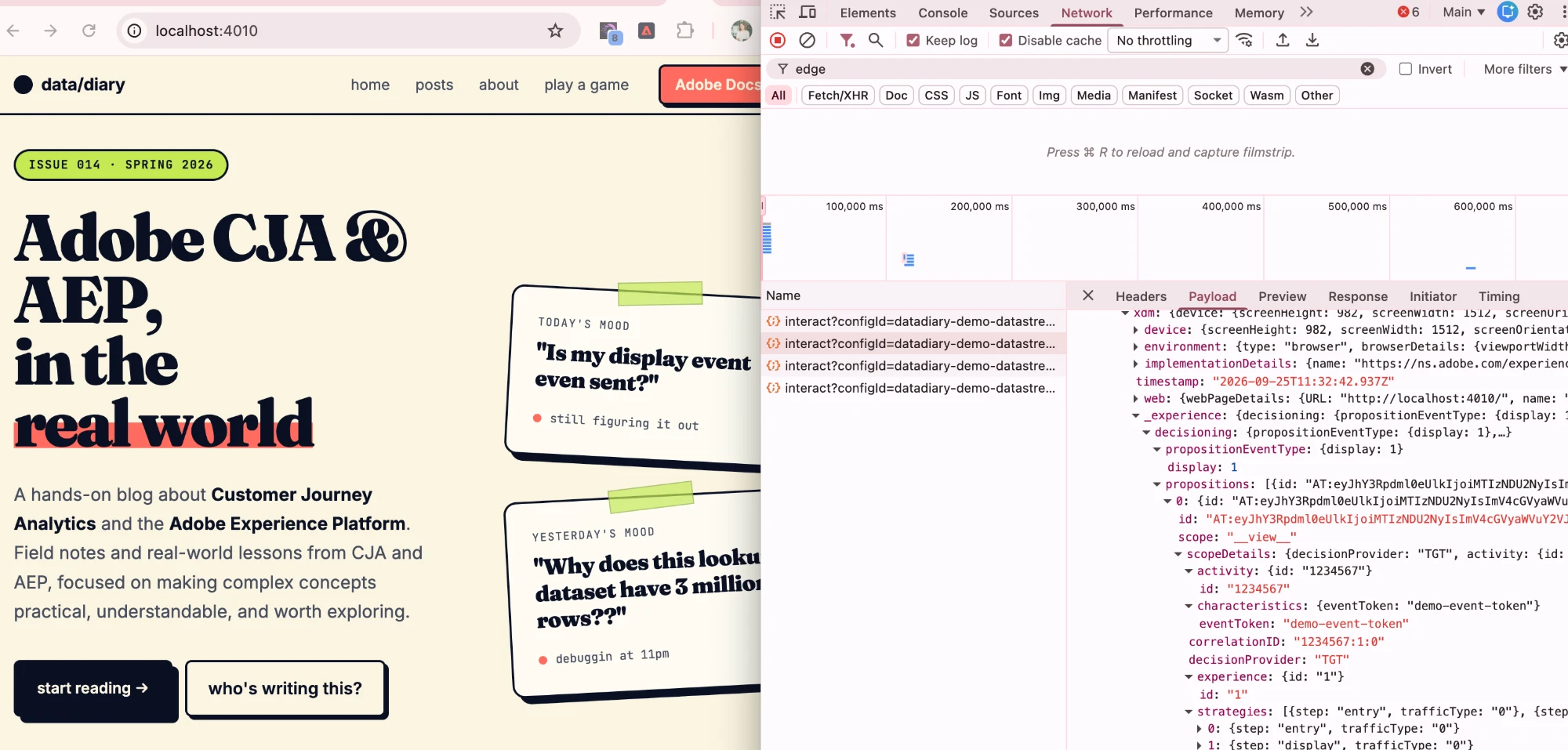
Simulated on DataDiary. The blog doesn’t run Target.
The signs that you’ve found the right one:
display: 1means it’s a display eventdecisionProvider: "TGT"means it comes from Target- The activity ID and experience ID match your activity in Target
You may also find a display event that only has the page name and no activity ID. That’s just a note that the page was shown. It doesn’t count anyone in a test.
5. Payload vs Preview
I think this is really good to know.
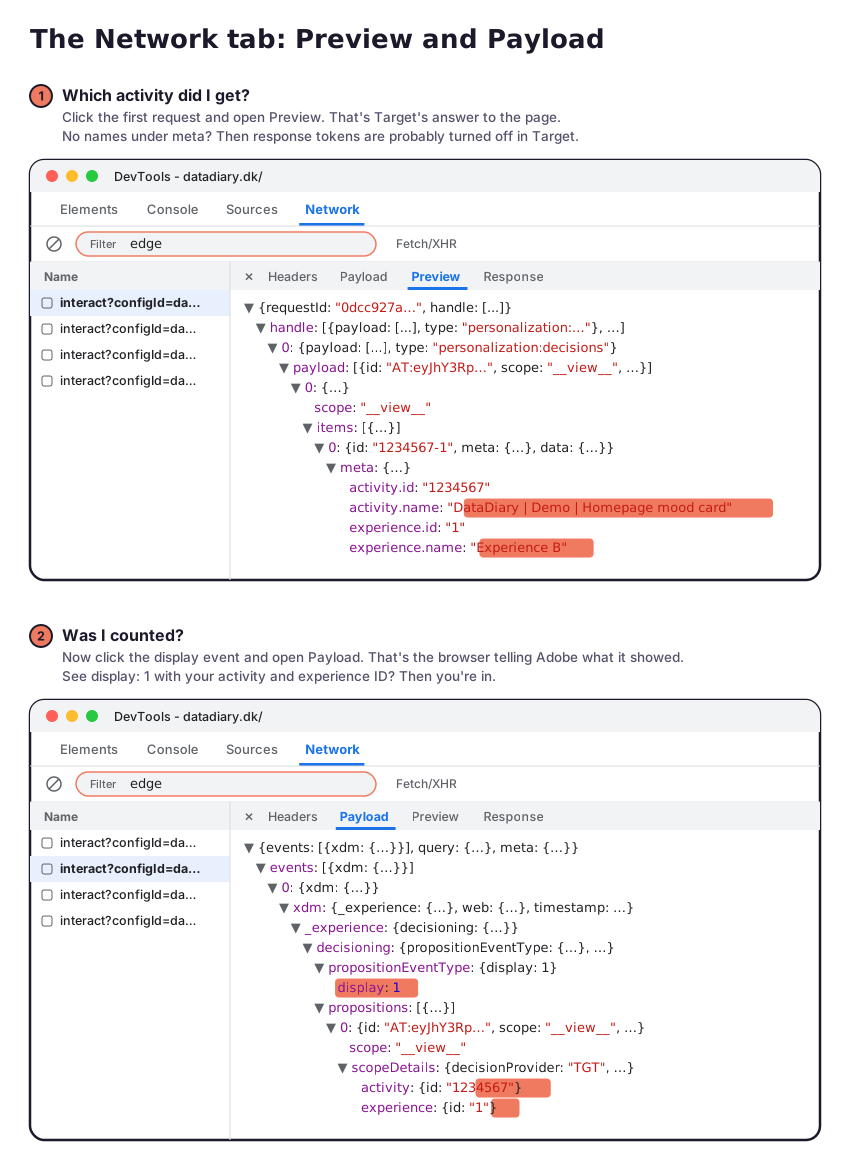
- Payload is what the browser sends to Adobe
- Preview and Response are what Adobe sends back
| Request | Payload (sent) | Preview (received) |
|---|---|---|
| The first request, where the page asks Target | “What should I show here?” | The answer: activity name, experience name and the content |
| The display event | “I showed this”: activity ID, experience ID and display: 1 |
Nothing important |
So checking a test takes both:
- The Preview of the first request tells you which activity and experience you got
- The Payload of the display event tells you that you were counted
6. Other things I picked up along the way
- Being counted isn’t the same as seeing it. Target counts you when the experience is delivered, not when your script has finished changing the page. If the script gives up, you’re still counted. It happens in both experiences, so it evens out, but it makes the difference harder to spot.
- Clicks aren’t always tracked automatically. If your success metric is a click, check that it’s actually measured (Adobe’s docs). A page view of the next page is often a safer choice.
7. Served vs seen, and what it means in CJA
Adobe has a knowledge base article called “Visitor identification process in Adobe Target”. The key point for me: Target only counts a visitor in an activity when they qualify for it and are served an experience. Served, not seen. So that would mean that visitors can be counted, even though they haven’t seen the experience (maybe something broke).
The article also explains how the A4T metrics are counted:
| Metric | Counted when |
|---|---|
| Unique visitors | From the moment the visitor enters the test. They stay counted, even if they never see the test content again |
| Visits | Also includes visits where the visitor didn’t see the activity |
| Activity impressions | Each time the test content is shown |
| Instances | Once per page where the content is shown |
Persistence in CJA
The activity and experience IDs only travel with the display event. A purchase later in the visit is a different event, without them. So in CJA, the Activity and Experience dimensions need persistence, or conversions can’t be connected to an experience. Adobe recommends setting the allocation to “All”, so a visitor can be in several activities at the same time.
Also: just a consideration. If you have turned on stitching, the number of people can shrink, because several ECIDs get tied to one person. If someone visits on both their phone and their laptop, Target may have put them in a different experience on each device. Once stitched, that person one can show up in both experiences in CJA.
Summing up
VEC or form-based: which one, for real? There is documentation, but to me it seems there are cases where the form-based composer can solve things the VEC can’t. Even on a standard website. So if the thing I’m testing is built by the front end after the page has loaded, I’d at least try form-based before spending hours in the VEC.
Then there’s debugging. The Target report only shows the totals. It can’t tell you whether an experience was served on this exact page load, whether it was counted, or which experience you ended up in. The console and the Network tab can.
I’m sure there are more tricks out there, and I’m still learning. If you have one, leave it in the comments.
Join the discussion
Leave a comment